How to set up mining notifications
The pool can tell you when a worker goes offline, when a block is found and when a payout leaves. Four channels do that job. This page explains what each one is like, so you can pick before you set one up.
What the pool can tell you
The pool can reach out to you when something happens instead of leaving you to refresh the dashboard. It can tell you when the pool finds a block, when you find one solo, when a payment leaves for your address, when one of your workers stops sending shares, when your accepted hashrate drops far enough to be worth looking at, and when the pool posts an announcement. A reply to a support ticket you opened can reach you the same way.
Nothing is sent until you link a channel to your own wallet address, and nothing is shared with anyone. A new link starts with every event switched on, so switch off the ones not worth interrupting you for, and change any of it whenever you like.
Four channels, and how they differ
Telegram and Discord deliver into a chat, ntfy delivers into a phone app, and browser push delivers to a browser window. You can use as many of them at once as you want, and each one keeps its own set of event switches, so the urgent alerts can go to your phone while the quieter ones stay in a chat.
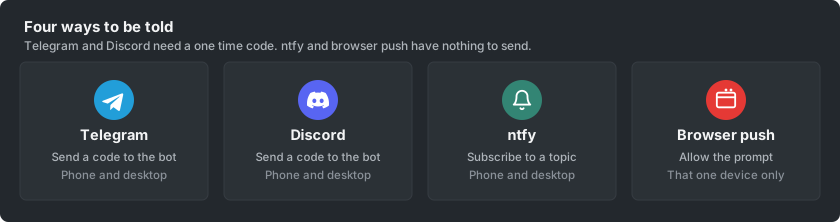
The only real difference is how the pool proves the channel belongs to you. Telegram and Discord ask you to send a short code to the bot in a direct message, and the alerts arrive in that same conversation. ntfy hands you a private address to subscribe to. Browser push asks the browser for permission and is finished in one click, except on an iPhone or iPad, where the site has to be added to the home screen before Safari offers the permission at all.
Pick the one that suits you
If you already live in a chat app, use that one, because the alerts land where you are already looking. Telegram and Discord are also the two that talk back, so you can ask them for your current stats or mute them for a few hours without opening the dashboard.
If you want alerts on a phone without joining a chat, ntfy is the shortest path, since it is a single address pasted into an app. If you sit at the same computer all day and only want a quiet nudge in the corner of the screen, browser push needs the least setup of all. On an iPhone or iPad it needs one step more than the others, because Safari only offers push to sites added to the home screen, which How to install the pool as an app on your phone covers in a minute.
Each channel has its own guide with the exact steps: How to set up Telegram mining notifications, How to set up Discord mining notifications, How to set up ntfy mining notifications, and How to set up browser push mining notifications.